Phishing messages are designed to trick you. They may look like they came from your manager, IT, a vendor, or another trusted source. Because these messages can look real, the safest approach is to pause, avoid clicking links or opening attachments, and report anything that seems suspicious.
Throughout Cyber Safety Month, employees are invited to participate in Republic Services’ third annual Phishing Derby Challenge. The challenge is simple:
- During the month, you’ll receive fake phishing emails that will give you an opportunity to spot and report suspicious messages.
- Team results will be tracked based on reported phishing emails.
- At the end of the month, we’ll announce the results and recognize the teams that reported the most phishing emails.
Stay alert, use the reporting tools when something looks suspicious, and help your team compete for the title of Phishing Derby Champion!
Pause. Verify. Report.
Report Phishing with the Report Suspicious Button
If you receive a work email that raises red flags, do not click links, open attachments, or download files.
Report it right away by selecting the blue Proofpoint button with the white letter “P”, then select “Report Phishing”:
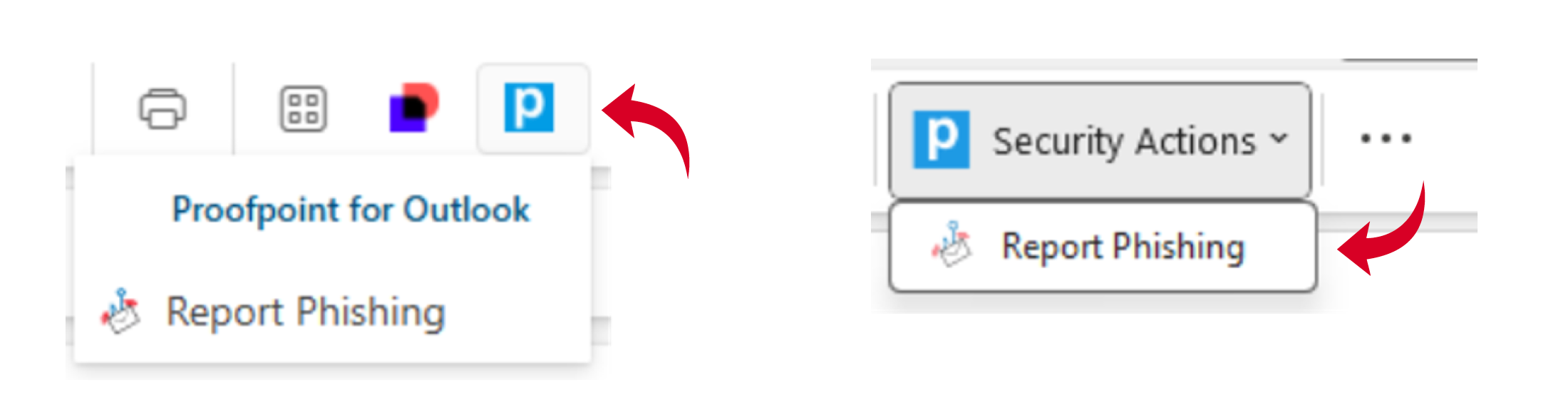
If the suspicious email is from an external sender, you can also use the Report Suspicious button in the banner near the top of the email, just below the subject line: