As part of our 2025 Cyber Safety Campaign, employees are invited to participate in Republic Services’ second annual Phishing Derby Challenge! Here’s how it works:
- During the month, you’ll have a few chances to report fake phishing emails.
- Metrics will be tracked across teams.
- At the end of the month, we’ll announce the results and recognize the winning teams that stood out in their efforts to report phishing.
So, stay sharp, be on the lookout, and claim the title of Phishing Derby Champions!
Always report any suspicious email as potential phishing.
Report Phishing with the Report Suspicious Button
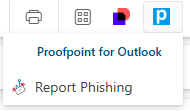
If you receive an e-mail at work that is raising red flags as a potential phishing e-mail, it’s critical that you do not click on anything within the email (for example, links or downloads). Report it immediately by clicking the blue Proofpoint button displaying the letter “P” in white, and then clicking “Report Phishing.”
 . .
. . 
If the suspicious email is from an external sender, you can report it by clicking on Report Suspicious button located on the banner of the email, just below the subject line.

When you report a suspicious email at work, you’re alerting our Cybersecurity team to step in and take protective measures. Every employee plays a vital part in keeping Republic Services Cyber Safe! Thank you for staying vigilant and reporting suspicious emails!
Watch the video below to learn more about phishing emails and how to report them.
Accessing Proofpoint Training
Phishing Training is not hosted on Workday but is assigned directly from Proofpoint Training. Access your training here or by simply clicking the Proofpoint Training tile in your ‘My Apps’ dashboard.